


Import cart
If you want to place a larger order on our website, use the Import cart function.


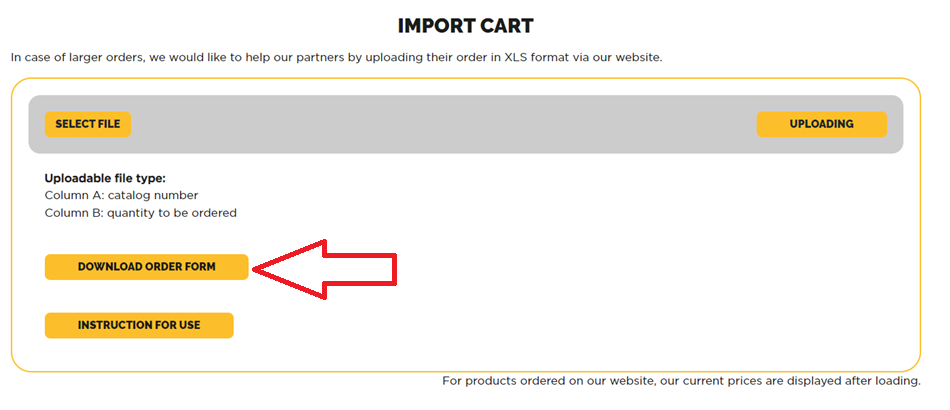
In case of larger orders, we would like to help our partners by uploading their order in XLS format via our website.
Click here: → Download loader XLS ←
To complete loading, proceed as follows:
1.) You must login/register on our website
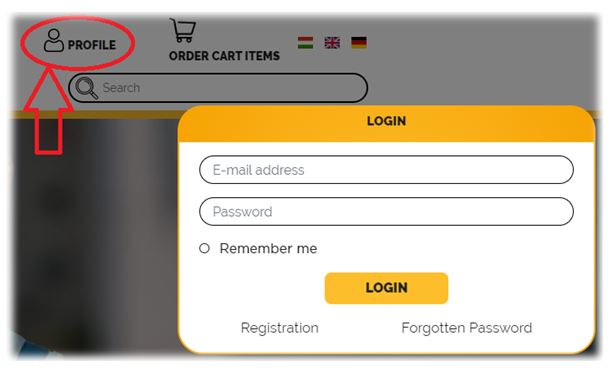
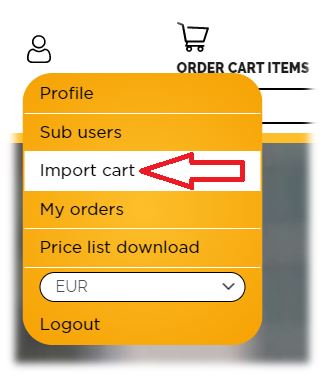
2.) After logging in, by clicking on the Import cart, it is possible to load an XLS format based on the specified criteria:
Column A = catalog number
Column B = quantity to be ordered
(other columns can be filled in as desired, you can even enter the product name after column B to help you, but our website only takes columns A and B into account)
or use the "Download order form" button to fill in the table and upload it.
3.) Once the upload is complete, our system will perform a check to see if everything matches.
Wherever the website indicates a discrepancy, the quantity that can be ordered is indicated in red :
.jpg)
4.) After that, you have to click on the continue button, here you can see that our system has automatically adjusted the quantity to be ordered to the packaging, which can be modified or deleted as needed on the order interface.
After checking the data, setting the delivery address, and accepting tha data protection declaration, the order can be sent to our company using the order button.
If you have any questions, feel free to reach out to your contact person!